Book a demo

Naming Workbench

One vocabulary for the whole organisation, linked to every system.

People stop misreading data when everyone uses the same words for it. The Workbench lets you agree each business term once, enforces it as your naming standard, and links it to every field, program and document that uses it.

search: "Supplier Number"
AGREEDSupplier Number corporate term
COBOLSUPPLIER-NUMBER
PL/ISUPPLIER_NUMBER
SQLsupplier_number
JAVAsupplierNumber
IN USE5 fields already carry this meaning
STANDARDpasses class word NUMBER, prime word SUPPLIER
anyone can search; no sign-in needed to look a name up

In brief

Fewer misunderstandings, faster decisions.Business, IT, compliance and audit read the same term the same way, because there is one agreed definition for each.

Standards that hold, without policing.New names conform from day one, because the Workbench checks them against your rules and rejects those that break them, with the reason.

Your systems become readable to everyone.Cryptic field names gain plain business names, because every field is linked to the agreed term it holds.

How it fits

One vocabulary at the centre of your estate.

The Workbench sits between the systems you already run and the people and tools that need to understand them. Mainframe and distributed systems feed in; agreed names flow out to developers, catalogues, documentation and AI.
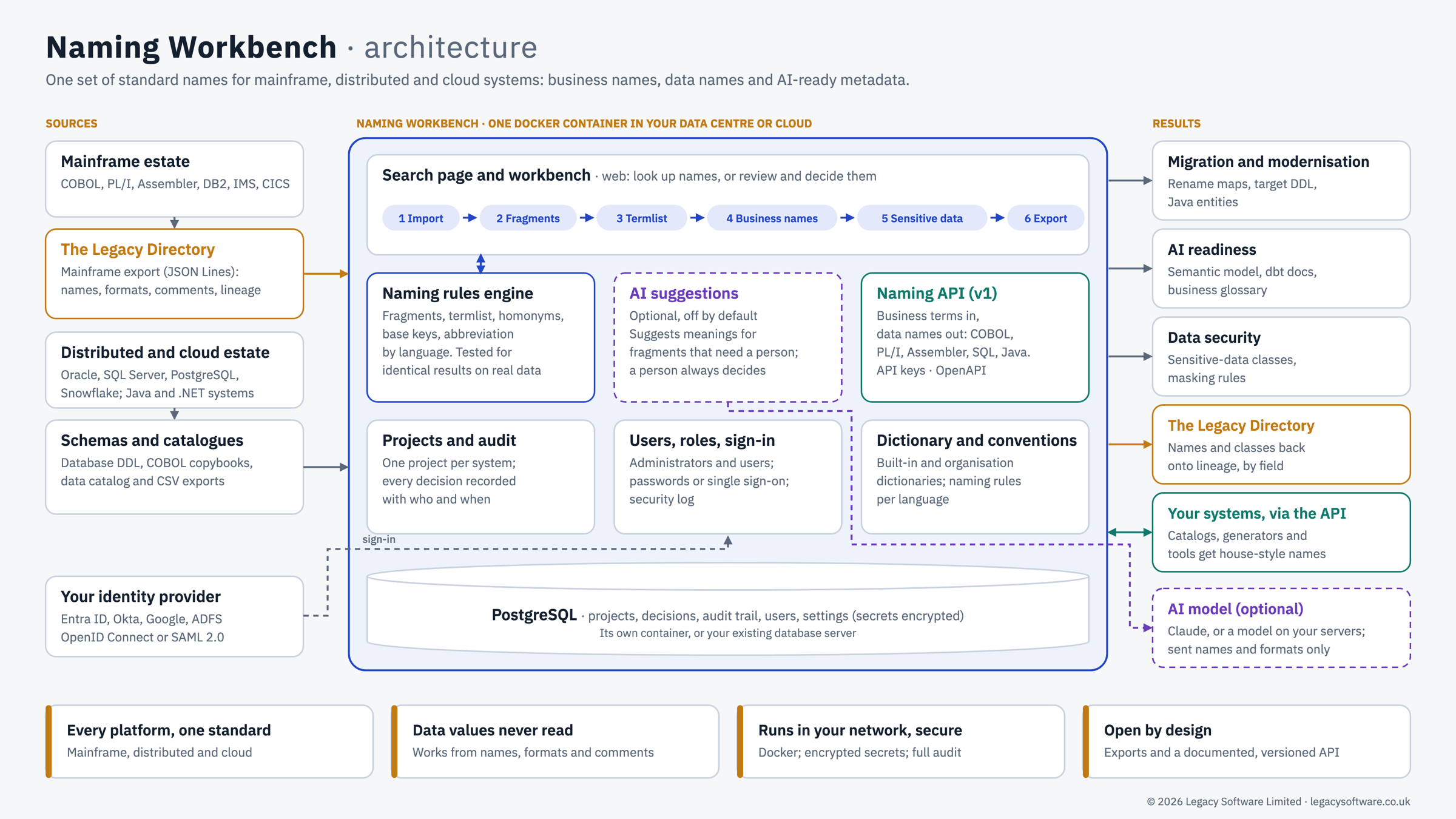
Naming Workbench architecture. Sources on the left: the mainframe estate (COBOL, PL/I, Assembler, DB2, IMS, CICS) through The Legacy Directory; the distributed and cloud estate (Oracle, SQL Server, PostgreSQL, Snowflake, Java and .NET) through schemas and catalogues; and your identity provider. In the centre, one Docker container in your data centre or cloud: the search page and workbench, the naming rules engine, optional AI suggestions, the naming API, projects and audit, users and sign-in, dictionaries and conventions, and a PostgreSQL database. Results on the right: migration and modernisation, AI readiness, data security, names returned to The Legacy Directory, your systems via the API, and an optional AI model.
Naming Workbench architecture: sources, the Workbench, and where the agreed names go. Open full size
In: everything you run

Your whole estate is covered, because names are taken from The Legacy Directory's source-to-target lineage, mainframe copybooks and tables, and distributed and cloud databases alike.

Centre: one agreed vocabulary

Each meaning is settled only once, because rules decide the clear cases, AI can suggest the rest, and your experts approve.

Out: wherever people work

Agreed names reach every team, because the search page, the naming API and standard exports deliver them to the tools people already use.

Documented and understood

See your applications properly documented, in words everyone understands.

Documentation is only useful if people can read it. The Workbench turns field names like L01B-OP-DATE into "Opening Date", so your system documentation speaks the language of the business.

A corporate vocabulary, simply

Build your vocabulary from what you already have, then link it to everything.

You don't start with a blank page. Your existing systems already contain most of your vocabulary; the Workbench finds it, standardises it and links it back.

Your naming conventions, the CLASS and PRIME words that structure each name, the order of prefixes and suffixes, and which rules apply to data items, programs, files or screens: all are set by your administrators with tick boxes, not code.

  1. Start from your systemsYou get a first draft in days, not months, because the Workbench reads the names already in use and settles the clear abbreviations by rule.
  2. Agree each term onceThe same concept is never named twice, because duplicates are found and linked, and each term is approved by the people who own it.
  3. Settle collisions where they liveAn abbreviation that means different things in different places is named correctly everywhere, because its meaning can be set for a layer, program, group, table or single data item.
  4. Set the corporate standardEvery project follows the same rules, because a corporate term list sits above them and only permitted systems may override it.
  5. Enforce it as you workNon-standard names never reach production, because a name missing a required class or prime word is rejected with the reason shown.
  6. Link it to systems and documentsThe vocabulary reaches policies, data catalogues and design documents, because it is published through a search page, an API and a business glossary export.
  7. Update your interface filesBoth sides of every interface use the same names, because the Workbench writes the source-to-target and interface files back with the new business names, with the separator you choose.

Company-wide

Not just for your computer systems. For compliance, audit and everyone in between.

The vocabulary describes your business, not just your code. Once it exists, the whole organisation can use it.

Compliance

Show regulators where sensitive data lives

Because card data, credentials and personal data are classified from their names, you can list every place they are held without reading a single data value.

Audit

Answer "who decided this, and why?" instantly

Because every name records whether a rule, an AI suggestion or a named expert produced it, and every override of the corporate standard is logged.

Visibility

Let anyone look a term up

Because the search page needs no training and, if you choose, no sign-in, staff across the organisation can check the agreed name for themselves.

Governance

Keep catalogues and lineage tools consistent

Because the glossary and results export straight to your data catalogue and to The Legacy Directory, every tool shows the same names.

Data protection

Build masking and test-data rules faster

Because sensitive fields are already identified, masking rules are exported ready for your test-data and loss-prevention tools.

Modernisation & AI

Migrate and adopt AI on solid ground

Because rename maps, database definitions, Java classes and semantic models are generated from approved names, new systems and AI tools inherit your meaning.

Only in the Workbench

One abbreviation, the right meaning in every corner of the estate.

Names are right where generic tools guess, because you can give an abbreviation its own meaning in any part of a system: a whole layer, one program, a single COBOL group, a DB2 schema or table, or one data item.

  • Real collisionsHomonyms stop corrupting business names, because "CL" can be Claim in the claims programs, Closing in the account tables and Claimant inside one group, all at the same time.
  • Most specific winsYou decide once, at the right level, because a meaning set for a group overrides one set for its program, which overrides the system-wide meaning, with no field-by-field rework.
  • Straight from the DirectoryThe hierarchy is already there, because the Workbench reads The Legacy Directory's source-to-target lineage, which places every data item in its layer, program, groups, schema and table.
  • Interfaces renamedInterface files change in hours, not weeks, because the Workbench writes your source-to-target and interface files back with the agreed business names: SUPP-REF-NO becomes SUPPLIER_REFERENCE_NO, and anything not yet agreed is left exactly as it was.
  • AuditedAuditors see why a field was named as it was, because every scoped meaning records its scope, the fields it decides and who set it.
meaning-by-scope.log
SYSTEMCL → Claim / Closing homonym
SCOPEProgram/CLMP* → Claim
SCOPEProgram/CLMP100/CLAIM-REC/CLAIMANT → Claimant
SCOPEProgram/ACST201B → Closing
SCOPEDB2/FIN/ACCTSTMT → Closing
NAMEProgram/ACST201B/…/CL-BAL → Closing Balance
NAMEProgram/CLMP100/…/CLAIMANT/CL-NM → Claimant Name
NAMEDB2/FIN/CLMTAB/CL_NO → Claim Number
the most specific scope wins; everything else keeps the system-wide meaning

Explainable

Every name shows its working.

You can defend every name to an auditor, because each one is traced to the rule, AI suggestion or expert that produced it.

  • Rules firstConsistent results every time, because naming rules proven on production mainframe data since 1993 settle the clear cases.
  • AI optionalYou stay in control, because AI suggestions are off until you turn them on, show their confidence and reasoning, and still need approval.
  • Your languagesDevelopers get names they can use straight away, because each agreed term is formatted for COBOL, PL/I, Assembler, SQL and Java, to the length and characters your administrator sets.
naming.log
SPLITL01B-OP-DATE → L01B · OP · DATE
PREFIXL01B removed: record prefix
RULEDATE → Date class word
AI · 93%OP → Opening not operator: the source comment says so
EXPERTapproved by the data owner
NAMEOpening Date · opening_date
CLASSIFYIS0501-CL-SURN → personal data UK GDPR
every name traced to its rule, AI suggestion or approver

Practicalities

Easy to adopt, easy to approve.

Your security and procurement teams can say yes quickly.

YOUR SERVER

Your data stays with you

Because the Workbench runs on your own server or cloud account, field names never leave your control.

SINGLE SIGN-ON

No new passwords to manage

Because it signs people in through your existing identity provider, using OpenID Connect or SAML, when you turn it on.

API

Fits your build pipeline

Because a documented naming API returns the standard name for any business term, tools and scripts can check names automatically.

SEATS

Predictable cost

Because it is licensed by named seat, and anyone can use the search page without one.

See your own field names turned into one agreed vocabulary, in a demo on a system like yours.

Book a demo